"Load the customer data into the CDP and send the campaign." That sentence gets written into a lot of statements of work, and it sounds like an afternoon of clicking. In reality, salesforce data cloud activation is a chain of about seven distinct hops, each one owned by a different team, each one with its own way of failing silently and handing you a green status while nothing actually moved. I built this for a multi-market retailer that already had its customer data sitting in a Databricks lakehouse, and the goal was simple to state: take a set of customers, segment them, and email and SMS them through Marketing Cloud. What follows is the real flow I ended up with, then the 11 mistakes I hit on the way, grouped so you can recognize yours fast.
The problem, stated plainly
The retailer kept customer data in a Databricks lakehouse organized as a medallion architecture: Bronze for raw source data, Silver for cleaned and conformed data, and Gold for the business ready aggregates. POS and ERP feeds landed in Bronze and rolled up through Silver into Gold. The ask was to take the Gold customer table, push it into Data Cloud, build a segment (think the dormant customer group, people who used to buy and went quiet), and activate that segment into Marketing Cloud so the campaign team could send. The hard constraint: do it as a real integration, no hand uploaded CSVs.
The end to end architecture
Here is the path that actually runs end to end:
Databricks (the Gold customer table) to Data Cloud (DLO then DMO) to identity resolution to Segment to Activation to Marketing Cloud (a sendable Data Extension).
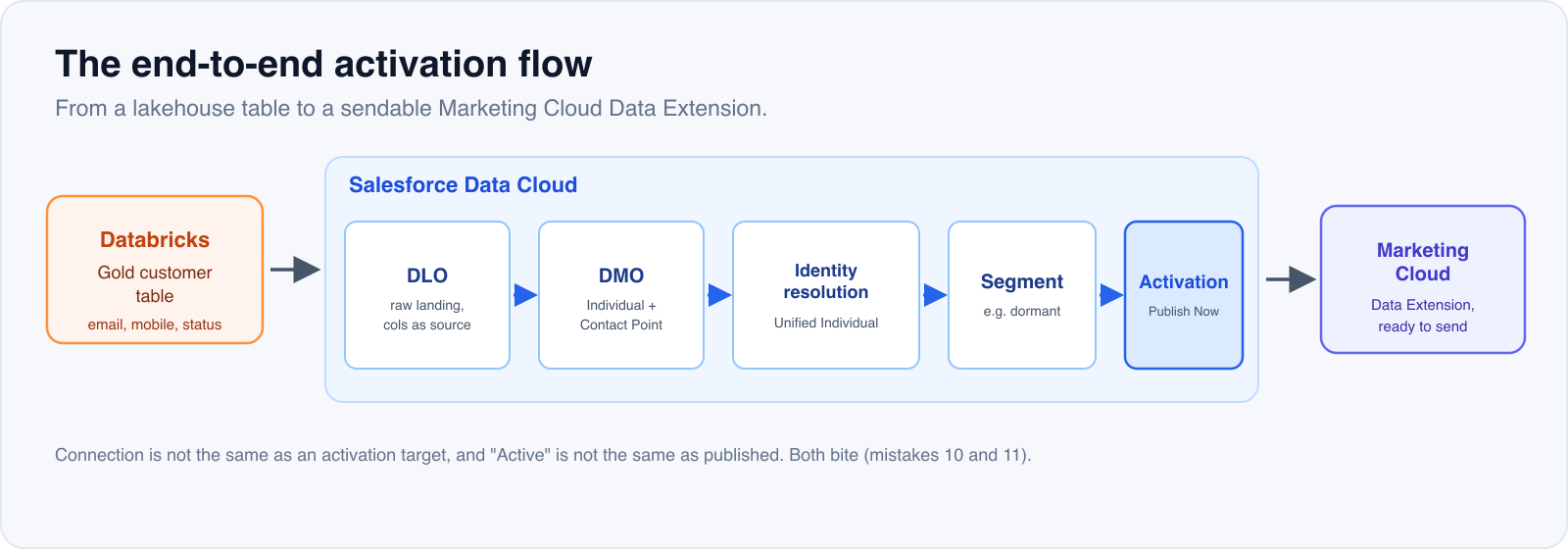
Walking each layer:
The source (Databricks Gold). I pulled from a single Gold customer table that already carried email, mobile number, and a lifecycle status field (active, dormant, churned). Picking Gold matters: it is the layer where the data is already cleaned and aggregated, so you are not re-deriving business logic inside Data Cloud.
Ingest into Data Cloud (the DLO). Data Cloud connects to Databricks through the "Databricks (Ingest)" connector, which runs against a SQL Warehouse. Each data stream, when it runs, produces a DLO (Data Lake Object): this is where the raw data lands, with columns mirroring the source table one for one. I set the warehouse to Small, Serverless, with auto stop, and left the data stream on manual refresh with auto sync off, because both Data Cloud and Databricks meter by compute run and you do not want a polling loop quietly burning credits.
Standardize (the DMO). A DLO cannot be segmented directly. You have to map it into a DMO (Data Model Object), which is an object shaped to Salesforce's standard data model. The two DMOs that matter for email are Individual (the person profile) and Contact Point Email (an email address tied to a person through the Party field). No Contact Point Email means no email activation, full stop.
Identity resolution. This is where Data Cloud collapses multiple records of the same person, arriving from multiple sources, into one Unified Individual, using a matching ruleset (by email, by an identifier, and so on). For a minimal one source demo you can segment directly on the source Individual, but in a real multi source build the Unified Individual is the entity you want to segment on, because it is the deduplicated customer. This is the same machinery that makes the activation side work, which is why I keep saying Marketing Cloud is really an identity resolution machine: unifying a customer across sources is the whole job, the sending is the easy part.
Segment. Filter people out of the DMO on a condition, for example the lifecycle status field equals "dormant."
Activation into Marketing Cloud. Data Cloud links to Marketing Cloud through a Marketing Cloud Engagement connection, where you pick the destination business unit. One trap up front: the connection is not the same thing as an activation target. Even after the connection is healthy you still have to create a separate Activation Target object before any target shows up when you build the activation. Activation then pushes the segment out as a Data Extension inside Marketing Cloud, ready to send from.
The 11 mistakes, grouped
Permissions (mistakes 1 to 4, 9)
1. The new user could not see Data Cloud at all. Ticking the feature checkboxes on the User Edit page did nothing. Data Cloud access comes from assigning the Permission Set Licenses (Data Cloud, Customer Data Platform, Customer Data Cloud for Marketing) plus the Permission Set (Data Cloud Admin). Assign the licenses first, then the permission set. Order matters.
2. The connection URL came back Invalid Format. I had pasted the workspace URL with its https:// prefix. The connection URL has to be the bare hostname, like dbc-xxxx.cloud.databricks.com, with no protocol and no trailing slash.
3. Tokens are disabled for your organization. The Databricks admin had turned off Personal Access Tokens. The fix is to have the admin re-enable PATs, then authenticate with the literal username token and the PAT as the password. The no PAT alternative is identity provider auth (U2M), but that needs the admin to configure an OAuth app and a Federation Policy, so it is not a five minute workaround.
4. PERMISSION_DENIED: User does not have USE CATALOG. The token was running as a Databricks user with no read access to the catalog. The owner has to grant use on the catalog, use on the schema, and select on the schema that holds the source table. All three.
9. The Marketing Cloud connector said The provided Marketing Cloud user must be an API user. The Marketing Cloud user behind the connection was not flagged as an API user. Go to Setup, Users, open the user, and enable API User. Small checkbox, blocks the entire activation side until it is set.
Ingest (mistakes 5, 7)
5. The DLO had only the primary key and none of the other columns. When you configure the data stream, the field list has checkboxes and it defaults to selecting only the primary key. You have to tick every field you actually need, or add them later through Add Source Fields. It is easy to click past this screen and not notice until the DMO is empty.
7. DUPLICATE_ROW showing up in Problem Records. The primary key had repeating values, because the source table had two rows for the same customer code. Duplicate records get rejected, so they never reach the DMO. Sanity check uniqueness by comparing the total row count against the count of distinct key values, then choose a table and key that are genuinely unique.
Mapping (mistakes 6, 8)
6. The segment returned 0 people and the DMO had no data. Two usual suspects. First, I had mapped a field after the last refresh, so the DMO never materialized the new mapping; you have to hit Refresh Now to rebuild it. Second, Individual was reporting a missing Last Name, which is a required field for segmentation, so you have to map some customer name column into Last Name or the records will not qualify.
8. No email to activate on. The first source table I chose did not carry email at all, and activation requires a contact point (email or SMS). The annoying twist: the two Gold tables that did have the pieces were actually two different customer populations keyed differently, so I could not join them to graft email on. The fix was to switch to a single self contained source table that already had email, mobile, and lifecycle status together. The lesson: pick a source table that already has its contact points, and do not try to stitch two tables that do not share a key.
Activation (mistakes 10, 11)
10. I created the activation and there was no target to choose. Same root cause as the architecture note above: the connection is implicitly different from the activation target. After the connection exists you still have to create an Activation Target object (New Activation Target, choose Marketing Cloud) before any target appears in the activation screen.
11. I published, and the Data Extension still had not arrived in Marketing Cloud. The segment was on manual refresh, so it did not run itself. An activation status of "Active" only means it is configured, not that data has moved. You have to open the segment and click Publish Now by hand. After that the run cycles through "Partner Processing" and then "Complete," and only then does the Data Extension actually show up in Marketing Cloud.
A note on cost, because most write ups skip it
Both ends of this pipe bill on compute, so a careless setup runs up a bill fast.
On the Databricks side, keep the SQL Warehouse Small, Serverless, with auto stop, so it spins up when a run needs it and shuts down when idle. On the Data Cloud side, leave the data stream on manual refresh (Frequency None), and keep the segment and activation on manual publish rather than scheduled refresh. Turning on periodic auto sync everywhere is the quickest way to get a surprise invoice for a flow that, during a build, you might run only a handful of times a day.
Takeaway
The value of Data Cloud is not the buttons. It is standardizing and unifying the data before you send anything, so the campaign team is targeting one real customer instead of three half duplicates. Across this whole build the failures clustered into three groups, and if you watch those three you will get through. First, permissions: Permission Set Licenses plus Permission Set, USE CATALOG on the Databricks side, and the API User flag on the Marketing Cloud side. Second, mapping: select every field you need, map Last Name, and Refresh Now so the DMO actually has data. Third, contact point and manual publish: the source needs an email or SMS, and activation only moves data when you Publish Now. Clear those three clusters and the flow runs clean.
If you are weighing Data Cloud and want this pipe built correctly the first time, without burning a month rediscovering these 11 traps, that is exactly the kind of work we do. Tell us about your stack at /contact, or see how we approach Salesforce data and marketing builds on our /service page.